Across Europe, a business can be open, freshly fitted and ready for customers while Google Street View still shows something else. Whatever sits on the map is what most people quietly accept as true. On this page you will see, through real examples in London and Spain, how a Google Street View virtual tour corrects that impression.
How a Wrong Street View Image Quietly Costs You Customers
A search on Google Maps is rarely just an address check. People are working out whether you are genuine, currently open, simple to reach and worth the journey.
Street View feeds straight into that judgement. Visitors study the front, look for the door, weigh up access and line you up against the place down the road.
When the image is wrong, the damage is silent. You may look shut, hidden or like a different company altogether, and the customer rarely asks. They simply move on to the next result.
What they see might be a former tenant, a unit mid refurbishment, or a lorry, a coach or scaffolding parked across your door. Sometimes it is just a confusing angle that hides which entrance is yours.
Why Your Street View Image Falls Behind
Street View is a snapshot, not a live feed. It freezes the single moment the Google car drove past, and that moment can be years old.
Coverage is uneven by nature. Some streets are revisited often, others are skipped for years, and plenty of locations have never been filmed at all. Routes, access, weather and Google’s own schedule all play a part.
So you can move premises, rebrand the front, replace the signage or transform the whole experience, and Google still presents the version of your address that no longer exists.
The Five Street View Problems We Are Asked to Fix Most
Owners across the UK and Spain reach out with the same request: take down the old Street View image and show the real business. It almost always traces back to one of these five situations.
1. The Old Occupant Is Still on the Map
You open at an address Google last filmed before you arrived, so the map still shows whoever was there before. The visitor assumes you moved, closed, or never opened, and looks elsewhere.
2. Something Is Parked Across Your Front
The car drives by at the worst possible second. A bus, a van, a skip, scaffolding or wheelie bins swallow your entrance, and the business reads as closed or unreachable.
3. The Frame Misses Your Entrance
Filmed from a moving vehicle, the default view can sit off to one side of your door. In shared buildings, arcades, retail parades, clinics and showrooms with neighbouring units, that is enough to send people to the wrong place.
4. The Business Simply Looks Neglected
The address is right, but the shutter is down, the sign is in shadow or the photo predates your refit. Nothing is actually wrong. The camera just caught a bad day.
5. The Car Never Reached You at All
Google only drives public roads. Private estates, gated sites, courtyards, campuses and pedestrian approaches are routinely left blank. When people need a visual cue to find you, that blank makes the trip feel like a guess.
What Customers Are Really Checking Before They Travel
Street View is not idle browsing. Real customers use it to make a practical call before leaving home. The questions in their head are simple:
- Which door is the entrance?
- Is the business actually here?
- Does it look open and well run?
- Can I get in with a wheelchair, a pushchair or limited mobility?
- Is there parking, and is the trip worth it?
- Does this feel safer to choose than the alternative?
If the image leaves them unsure, they will not message you to clarify. They will pick someone whose location looks certain.
Why Waiting on Google Is Not a Plan
Reporting an outdated image to Google is possible, but you cannot summon the car back, and you cannot decide when, or even if, a fresh image goes live.
Even a return visit guarantees nothing. The front could be blocked again, the angle could still miss the door, and the bad image can linger on the map for months or years.
How 360 View Fixes It
We hand you control of how your business shows up on Google. The aim is to move you from simply being found to being properly understood, so customers know the place before they set off.
This is more than swapping one photo. We build a connected Google Street View virtual tour that begins at the kerb, steps through your door and carries on inside, letting people experience the business almost as if they walked in.
Depending on the site and the issue, a tour can show:
- Your real front, clearly, from the street.
- An entrance people recognise on arrival.
- The unbroken path from outside to inside.
- Your layout, scale and design, so the space feels known.
- Your products, service and atmosphere, beyond a flat facade.
- Exterior coverage where the Google car never drove.
Instead of leaning on an old or unlucky drive-by, your listing carries a current, deliberate and professional view.
A Planned Capture Beats a Lucky Drive-By
The Google car records whatever happens to be there. We plan the capture around your business.
You get time to prepare beforehand: clean the front, light the sign, arrange stock and clear the doorway. We also pick the time of day that suits your light, your traffic and your footfall.
The outcome is not luck. It is your space at its authentic best. Faces, number plates and sensitive details are blurred before anything goes live.
Before and After: What Changes for the Customer
Beforehand, an old or blocked image plants doubt. Is this the right place, is it even open, where do I go in? That doubt sends people elsewhere.
Afterwards, they recognise the front, find the entrance and step inside before they have left the house. Confidence replaces friction, because they understand the space in advance.
Here are real businesses, in London and Spain, where we resolved exactly this on Google Maps.
Brompton Junction, Covent Garden, London: Before and After
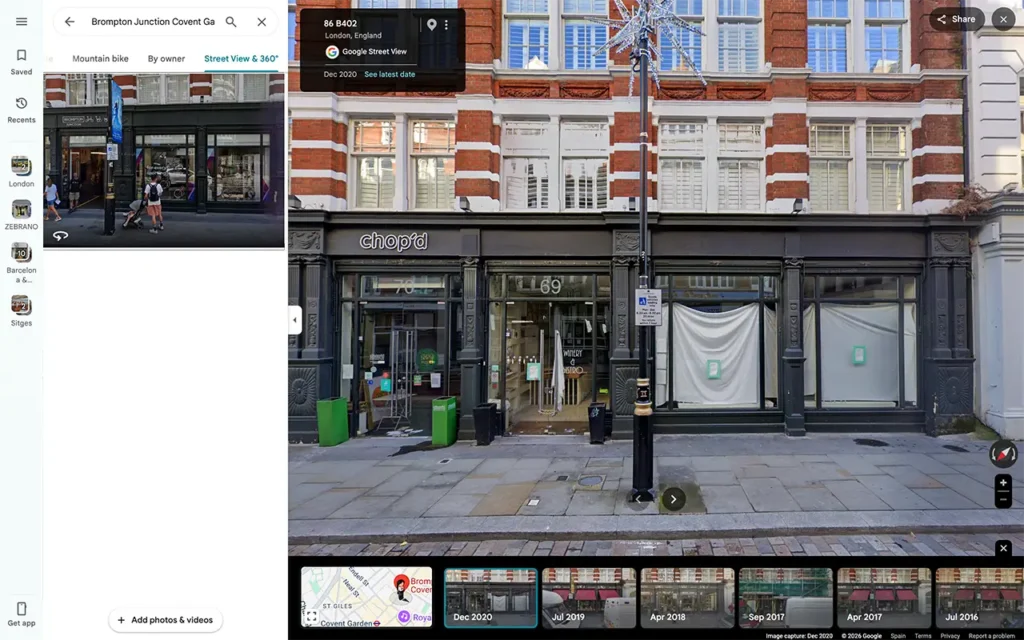
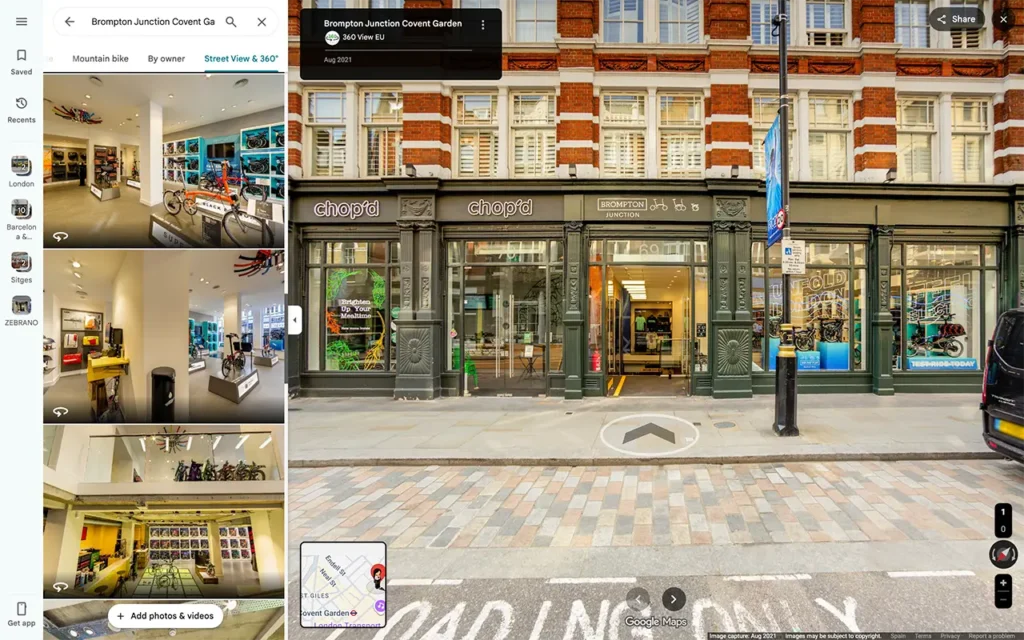
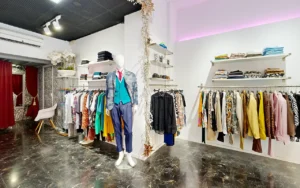
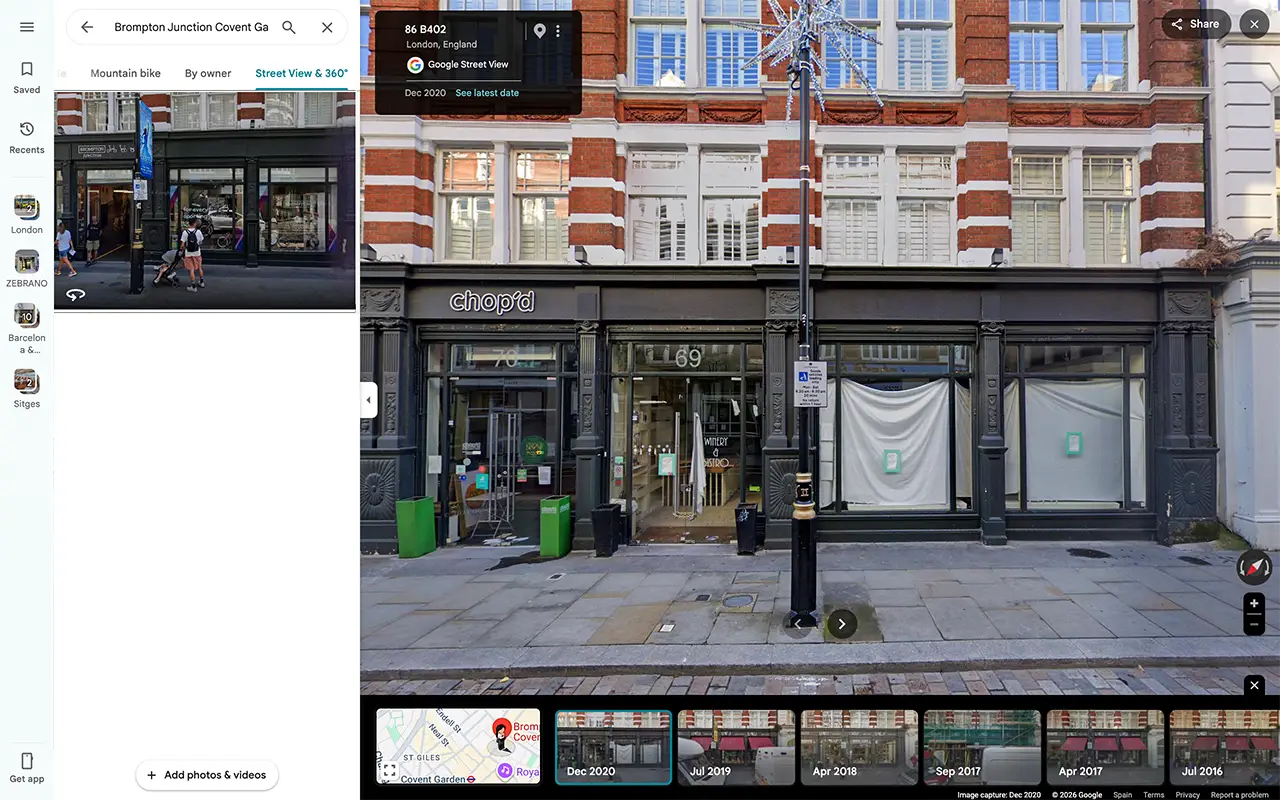
After this store moved into its Covent Garden home, Google Street View still carried the old scene at the address: a closed unit with refurbishment under way inside. For anyone checking the map, it was a cold welcome.
We produced a Google Street View virtual tour of the correct front and let visitors step inside to explore the store.
In the roughly five years since it went live, Google reports the tour now draws around 4,780 views a week. A shopfront image is never just a picture. It shapes whether a customer trusts you enough to walk in.
Idyllica Wine Store, Spain: Before and After
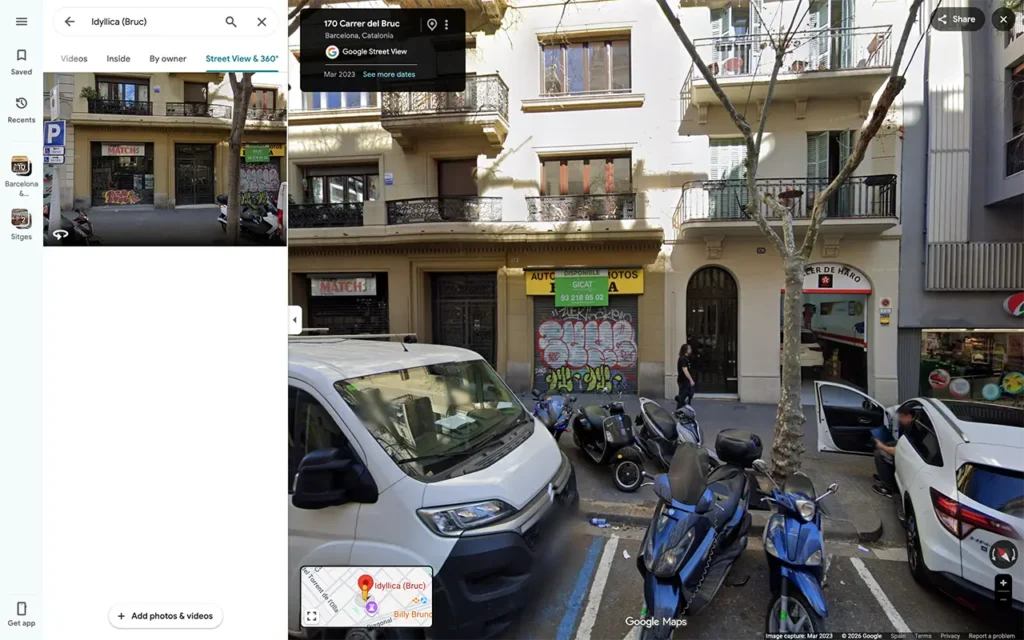
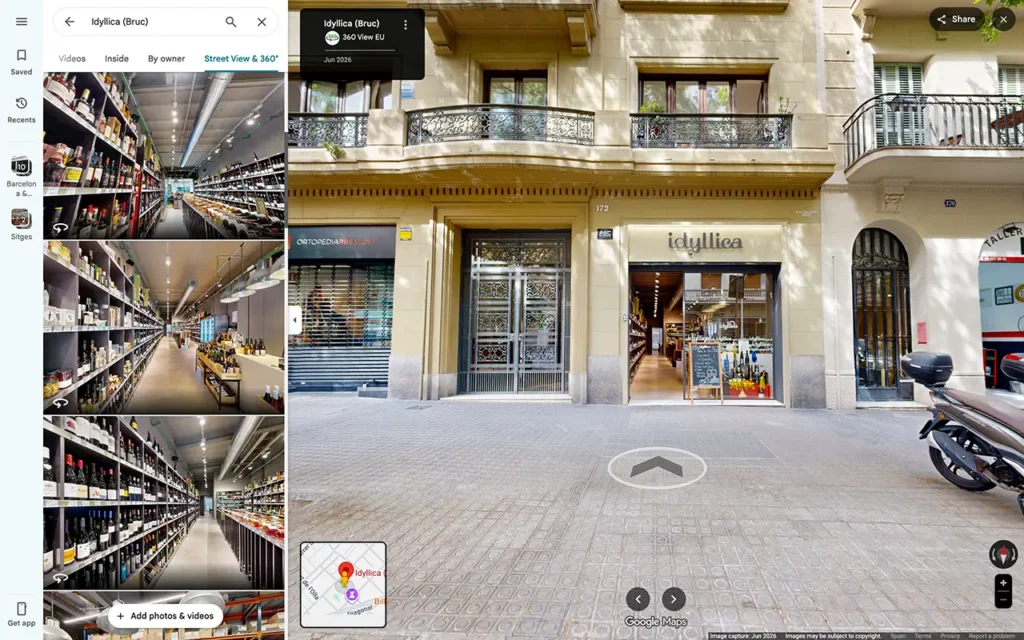
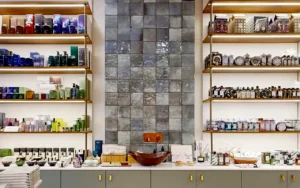
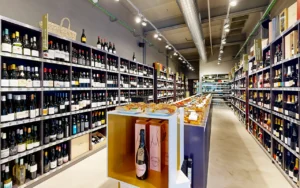
Until our visit, Google Street View still showed the business that held the unit before Idyllica arrived. Anyone searching for the wine store met an unfamiliar front and had every reason to doubt the address, or whether the shop was even open.
We captured a current Google Street View virtual tour of the right front and joined it to a walk through the interior, so customers see the shop, the shelves and the mood before they arrive.
The doubt clears at once. Search the location today and you find the real Idyllica Wine Store, not the business that came before it.
London Private Hospital, London: Before and After
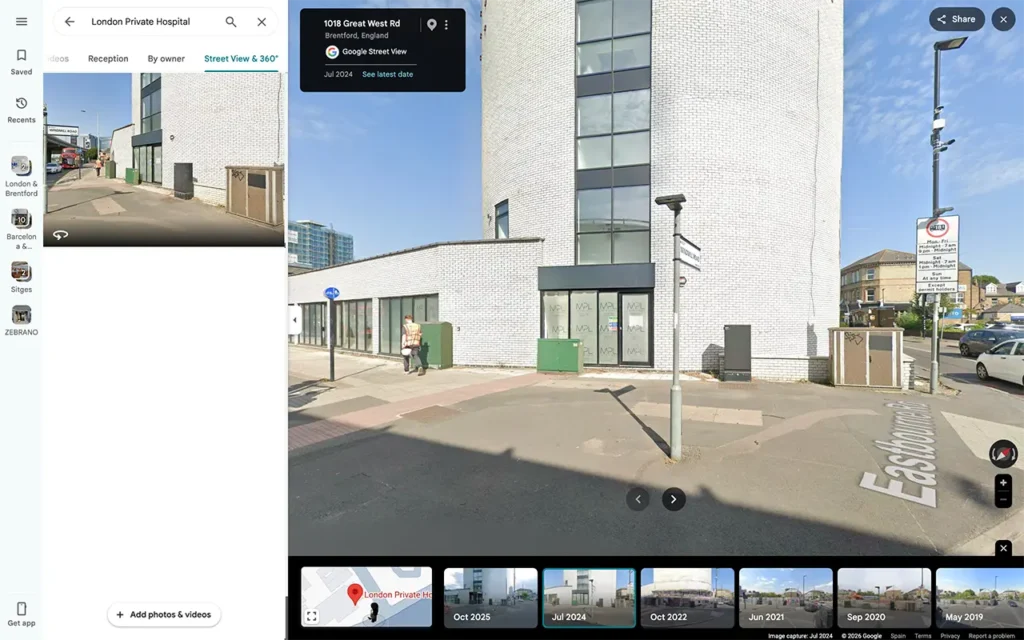
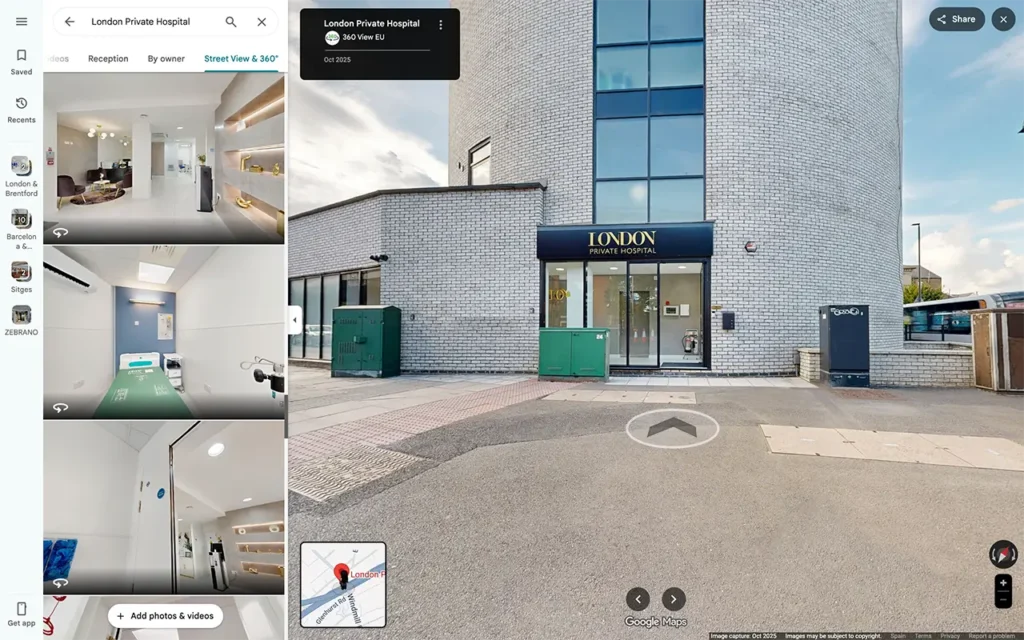
Google Street View showed the building mid build, windows boarded and no clear entrance or signage on view. To a patient checking ahead, it read like a block of flats rather than a hospital, the worst possible signal for someone already nervous about an appointment.
Because the building and its approach were new, the Google car held no current image of the hospital as it stands today. Waiting for one was not realistic.
We captured the hospital as it is now, with a clear entrance, visible signage and a connected route guiding patients from the street to reception. Visitors recognise the building, find the right door and arrive at ease.
Carmina Rotger Store, Spain: Before and After

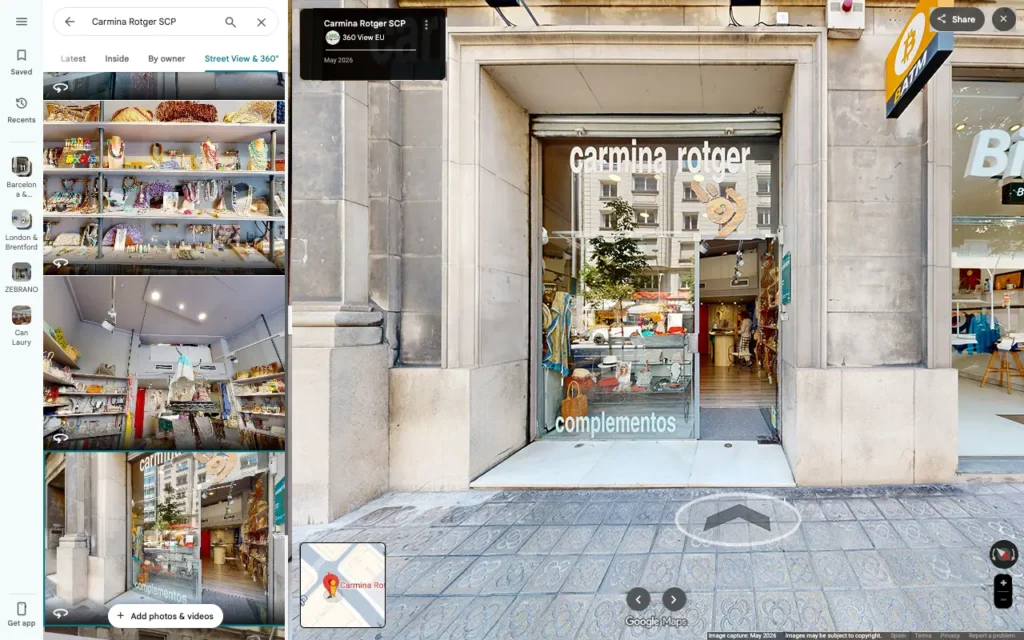
On the day the Google car passed Carmina Rotger, a bus sat directly in front of the shop. The front was hidden, and customers could neither see what the business looked like nor be sure they had the right spot.
It is one of the most common Street View problems and one of the most unfair, because the business did nothing wrong. The timing alone caused it.
We captured a clean, unobstructed view of the front, then linked it to a tour inside the store. Customers now see the shopfront, recognise the entrance and explore the space before they visit.
Does the Tour Replace Google’s Own Car Image?
Not always. Google’s official image can remain in Street View history, and Google decides which view shows by default in each part of the map.
What a professional 360 tour does is add a current, business led layer to your Google presence. It shows the right front, links outside to inside and gives people a far clearer read of your business. For most owners, that is enough to clear the confusion and build trust.
Why It Matters for Local Search and Trust
Your Google Business Profile, your Maps listing, your reviews, your photos and Street View all pull together. Someone finds you in search, opens your profile, scans reviews, checks photos and then opens Street View to confirm the spot.
Line everything up and you look dependable. Let the photos say one thing while Street View shows an old or blocked front, and the visitor hesitates. A current tour keeps the whole picture consistent and gives people a reason to choose you.
Which Businesses Gain the Most
It matters most for any business that lives on real visits, including:
- Shops, showrooms and car dealers
- Restaurants, cafes, bars and hotels
- Gyms, studios and beauty salons
- Clinics, dental practices and pharmacies
- Estate agents, coworking spaces and local services
- Schools, training centres and event venues
If customers come to you in person, your Street View presence is working for you or against you.
Three Ways to Deal With a Wrong Street View Image
If your business looks outdated, blocked or unclear on Google Street View, you have three realistic moves.
- Report it to Google. This flags where an update is needed, with no promise on timing.
- Strengthen your Google Business Profile photos. Upload current shots of the front, entrance, interior and team so people see the truth even if the map lags.
- Commission a professional Google Street View virtual tour. The most controlled route: the correct front, outside joined to inside, and a clear way to explore before visiting.
Take Control of Your Google Maps Presence
You will never control when the Google car passes, or whether a coach, a lorry, a bin or scaffolding lands in front of you when it does.
You can control how your business is presented with a professional Google Street View virtual tour. If your front looks outdated, blocked or unclear, we help you replace that impression with a sharper, truer, more professional one.
360 View works with businesses across Europe and the UK, creating Google Street View virtual tours, indoor walk-throughs and outdoor 360 coverage that help people understand, trust and visit real places. If your doors are open, your Google Maps presence should make that obvious.
Frequently Asked Questions
How Often Does Google Refresh Street View?
There is no set rhythm. Busy areas may update regularly, while other imagery can sit untouched on the map for years.
Can I Make Google Update My Business Image?
You can report an outdated image, but Google gives no guarantee on when, or whether, a new one is captured and published.
Will a Professional Tour Remove the Old Car Image?
Not always, but it adds current, useful imagery to your Google Maps presence and helps customers see the correct front and interior.
What if a Bus or Lorry Is Blocking My Front?
A planned capture shows your front at a better moment, with the entrance clear and the business at its best, as we did for Carmina Rotger in Spain.
Can You Add Street View Where the Car Never Drove?
Yes. For private roads, gated sites, courtyards, campuses and pedestrian approaches beyond the car’s reach, we capture and publish new 360 coverage so people can find and explore your location.
Can Customers Walk From the Street Into My Business Online?
Yes. A connected Google Street View virtual tour carries visitors from outside to inside, helping them read the entrance, the layout and the experience.
Is It Worth It for a Small Business?
Very much. Local customers lean on Google Maps to choose where to go, so a clear front and a virtual tour build trust before anyone arrives.
Why Not Just Wait for the Google Car?
Because you control none of it: when it comes, what it catches, or whether the new image is any clearer. A professional capture puts that control back in your hands.
Ready to Correct How Your Business Looks on Google Maps?
Tell us what you need, we handle the detail, and your business goes live on Google Maps. Three steps:
- Plan the route. We map the journey from your street to inside your business.
- Capture and build. We capture your front and interior at their best, then build the connected tour.
- Go live on Google Maps. Your tour is published to your Google Business Profile for customers to explore.
Request a free quote for your location. Send us a message and we will show you how your business could look on Google Maps.